


Samsung is closing Quick Measure, the camera measuring app on Galaxy phones, on December 31, 2026. Many of our clients used it for one small job: checking the wall, window or booth where a banner will hang before they ask us for a design. This guide explains what changes, which app to use from now on and how to measure a space for a banner or sign with your phone.
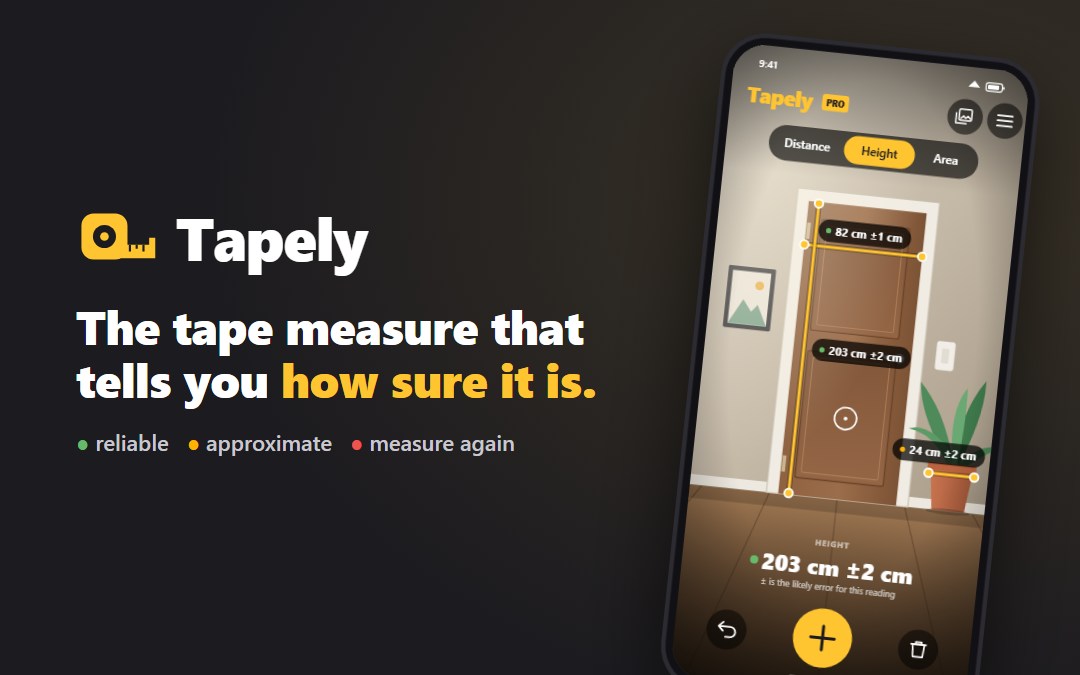
Short answer: after December 31, 2026, Quick Measure can no longer be downloaded or updated. A good alternative on Android is Tapely, an AR tape measure that shows how accurate each reading is. Use it to plan your banner size, then confirm the final size with a real tape before printing.
Disclosure: Tapely is made by the same team behind CoBanner. It is free for measuring distance and has no ads.
What is happening to Samsung Quick Measure
In September 2026, the Galaxy Store page of Quick Measure received a notice that the app reaches end of service on December 31, 2026. The drawing app AR Doodle got the same notice.
- No new downloads after that date.
- No more updates, so a later One UI update can break the app.
- A copy that is already installed keeps opening for now, according to press reports.
- No way back after a factory reset or on a new phone.
Samsung says that the apps will return with improved services, but it has not given a date. Google closed its own Measure app in 2021, so Android has no built-in measuring app to fall back on.
The alternative: Tapely
Tapely on Google Play works on Galaxy phones and on other Android phones that support ARCore. You move the phone over the area for a few seconds, tap the first point, tap the second point and read the length.
The difference from other measuring apps is that Tapely tells you how far to trust a reading. Each number comes with its likely error and a colored dot:
- Green, for example 84 cm ±1 cm: reliable
- Amber, for example 46 cm ±3 cm: good enough to plan
- Red, for example 2.1 m ±12 cm: move closer and measure again
| Samsung Quick Measure | Tapely | |
|---|---|---|
| Available in 2027 | No new downloads or updates | Yes, on Google Play |
| Phones | Samsung Galaxy only | Android phones with ARCore |
| Distance | Yes | Yes, free |
| Height and area | Yes | Yes, in Pro (one payment) |
| Shows the likely error | No | Yes, on every reading |
| Ads or subscription | None | None |
For a longer comparison, read Tapely as a Samsung Quick Measure alternative.
How to measure a space for a banner with your phone
- Turn on the lights. AR measuring is more accurate in a bright room.
- Scan the wall. Move the phone slowly over the area for a few seconds. Plain white walls are difficult, so aim at edges, frames or corners.
- Measure the free width. Tap one side of the space, then the other. Measure between obstacles such as light switches, shelves and door frames, not from wall to wall.
- Measure the free height. For a hanging banner, measure from where the top edge can be fixed down to the lowest point that people can still see.
- Check the dot. If a reading is amber or red, step closer and repeat it.
- Take a photo of the space. Send it to your designer together with the numbers. A photo shows the colors, the light and the obstacles that numbers cannot.
- Subtract a margin. A banner that fills the space edge to edge looks cramped. Leave 5 to 10 cm (2 to 4 inches) free on each side.
A phone is good for planning and for a quote. Before the file goes to print, confirm the final width and height with a steel tape. Printers work to the millimeter, and a banner that is 2 cm too wide for its frame is an expensive mistake.
From measurements to a banner size
You rarely need a custom size. Printers and stand makers work with standard formats, so measure your space and then choose the nearest standard size that fits.
| Banner type | Common sizes | Space you need |
|---|---|---|
| Retractable (roll-up) banner | 33 x 80 in (85 x 200 cm) | About 1 m of floor width and 2.1 m of height |
| Wide roll-up banner | 100, 120 or 150 cm x 200 cm | The banner width plus 10 cm on each side |
| Vinyl banner for a wall or fence | 3 x 6 ft, 4 x 8 ft (about 90 x 180 cm, 120 x 240 cm) | The banner size plus room for the fixings |
| Backdrop for a booth or event | 8 x 8 ft, 8 x 10 ft (about 2.4 x 2.4 m, 2.4 x 3 m) | The full back wall of the booth |
Also measure the viewing distance, which is how far away most people will stand. As a rule of thumb, text needs about 1 inch (2.5 cm) of letter height for every 10 feet (3 m) of distance. A headline that people read from 9 m away should be at least 7 to 8 cm tall.
For screens, our guide to banner sizes for social media lists the pixel sizes. For print, our article on ordering banners online explains files and materials.
What to send your designer
- The free width and height of the space, and the unit you used
- The type of banner: roll-up, vinyl, backdrop or web
- A photo of the place where it will stand or hang
- The viewing distance
- Your logo, your text and the date you need it
With these five things, we can prepare a custom banner design or a retractable banner design in the right size at the first attempt.
FAQ
When does Samsung Quick Measure shut down? The Galaxy Store listing says Quick Measure reaches end of service on December 31, 2026. After that date it can no longer be downloaded and it gets no more updates.
What is a good alternative to Samsung Quick Measure? Tapely is an AR tape measure for Android that works on Galaxy phones. Measuring distance is free, height and area are in a one-time Pro purchase, and every reading shows its likely error. It has no ads and no subscription.
Can I measure a wall for a banner with my phone? Yes, for planning and for asking for a quote. A phone measurement is usually within a centimeter or two in good light. Before you send the final size to a printer, confirm it with a real tape measure.
What size is a standard retractable banner? The most common retractable (roll-up) banner is about 33 x 80 inches, or 85 x 200 cm. Wider models of 100, 120 and 150 cm also exist.
Measured your space? We design the banner.
Send us the size, a photo and your text. We design banners for print and web, and you pay only if you are happy with the result.