


The State of Graphic Design in 2025: Trends, Tools, and What Businesses Are Getting Wrong
Published July 2025 by CoBanner
In a world driven by visuals, graphic design is no longer just about aesthetics—it’s about communication, conversion, and brand trust. As we pass the halfway mark of 2025, businesses across industries are being forced to rethink how they present themselves online and offline.
In this report, we dive deep into the trends, tools, and strategic shifts shaping graphic design in 2025. Plus, we uncover the most common mistakes businesses are still making—and how to fix them.
Emerging Graphic Design Trends in 2025
1. Minimalism with Depth
Flat design is evolving. 2025 sees a fusion of minimalism and rich textures: grain overlays, subtle shadows, layered gradients. Brands are embracing simplicity, but with personality.
“We’re seeing a shift toward more tactile-feeling digital visuals. Brands want to feel human again.” — Debbie Millman, Brand Consultant
Brands like Apple and Stripe exemplify this balance—clean interfaces with subtle gradients and layered visuals.
2. AI-Assisted Design (but Human-Centered Output)
With tools like Adobe Firefly and Canva’s Magic Design, AI can now generate layouts, images, and even brand kits. Yet designers must supervise outputs for quality, bias, and originality.
According to a 2025 Adobe Firefly report, 76% of creative teams now use AI tools in their daily workflows.
3. Accessibility as a Standard, Not a Bonus
WCAG compliance and inclusive visuals are now must-haves. Color contrast, legible fonts, and intuitive navigation aren’t optional—they’re expected.
Want to test your own site? Try WAVE Web Accessibility Evaluation Tool.
4. Brutalism and Maximalism Make a Comeback
Not every brand wants to play it safe. Harsh grids, bold fonts, and intentionally “ugly” compositions are being used by fashion, creative, and youth-focused brands.
“Gen Z wants boldness, not beige. Design is loud again.” — Meg Lewis, Designer & Speaker
5. Motion and Microinteractions
Small animations—like loading spinners, hover effects, or animated logos—enhance UX and visual storytelling. These details boost engagement and signal professionalism.
Well-known examples include Linear and Pitch, where animations enhance both delight and usability.
Popular Graphic Design Tools in 2025
The designer’s toolbox has expanded:
- Figma: Still the go-to for UI/UX collaboration.
- Canva Pro: Dominates the DIY market and non-designers.
- Adobe Illustrator + Photoshop: Industry standards, now integrated with Firefly AI.
- Khroma: AI-powered color palette generator.
- Framer: Interactive prototyping with motion and real-time testing.
“Tools like Figma and Framer aren’t just for designers anymore. They’re shaping how entire teams collaborate on brand visuals.” — Ethan Parry, UX Researcher, Google

What Businesses Are Still Getting Wrong
Despite the evolution in tools and trends, many brands still make critical design errors that hurt credibility and conversions.
1. Design Inconsistency Across Channels
Logos, fonts, and color schemes vary across websites, social media, and print materials. This erodes brand trust.
Fix: Use brand guidelines and centralize design assets in cloud-based tools like Figma or Canva.
2. Prioritizing Looks Over Function
Beautiful visuals that confuse users or delay actions harm performance.
Fix: Focus on UX design principles: clarity, hierarchy, and simplicity.
3. Overusing Templates Without Customization
Templates save time, but using them as-is leads to generic branding.
Fix: Customize templates to match your tone, audience, and purpose.
4. Ignoring Mobile Design
With over 60% of global traffic on mobile, non-responsive designs are a conversion killer.
Fix: Test visuals on multiple screen sizes and platforms.
5. Skipping Alt Text and Accessibility
Leaving alt text blank or relying on color-only messaging excludes users and hurts SEO.
Fix: Use clear alt text and contrast checkers like WebAIM.
6. Designing Without User Testing
Skipping real feedback leads to assumptions. Without user testing, even the best-looking designs can fail.
Fix: Run quick feedback loops using tools like UserTesting or Maze.
Mini Case Study: How One Brand Boosted Conversions With Microinteractions
In early 2025, a Nordic e-commerce brand redesigned their checkout page with animated microinteractions—like hover highlights, confirmation ticks, and subtle loaders. Using Figma and Framer, the design reduced bounce rates by 28% and boosted conversions by 17%.
According to Baymard Institute, 70% of users abandon carts due to friction or poor UX—small design tweaks can have huge impact.
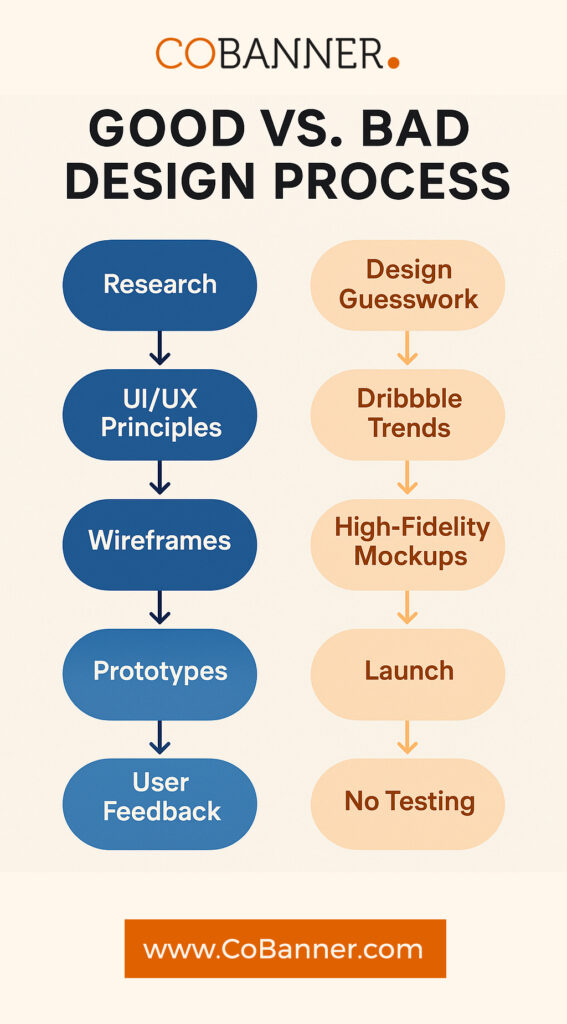
This infographic illustrates two contrasting design workflows—one guided by strategy, feedback, and iteration versus one driven by rushed aesthetics and assumptions. The “Good Design Process” follows a structured path: research, prototyping, testing, and refinement. In contrast, the “Bad Design Process” skips critical steps like user testing and accessibility checks, leading to inconsistent, underperforming outcomes. By visualizing these paths side-by-side, businesses can better appreciate how a thoughtful design journey leads to brand credibility, improved UX, and stronger conversion rates.
Expert Predictions: The Next 5 Years of Design
- Design and AI Will Co-Create: AI handles layout suggestions, humans refine.
- Every Brand Becomes a Media Brand: Businesses will produce more video, motion graphics, and social-first assets.
- Interactive Content Will Go Mainstream: Scroll-triggered animations, clickable infographics, and quizzes.
- Ethical Design Will Matter: Data privacy, neurodiversity awareness, and anti-manipulation design.
“Designers won’t be replaced by AI—but by other designers using AI well.” — Khoi Vinh, Principal Designer at Adobe
“Interactivity will define the next wave of brand storytelling.” — Sarah Doody, UX Strategist
Bonus: 2025 Graphic Design Readiness Checklist
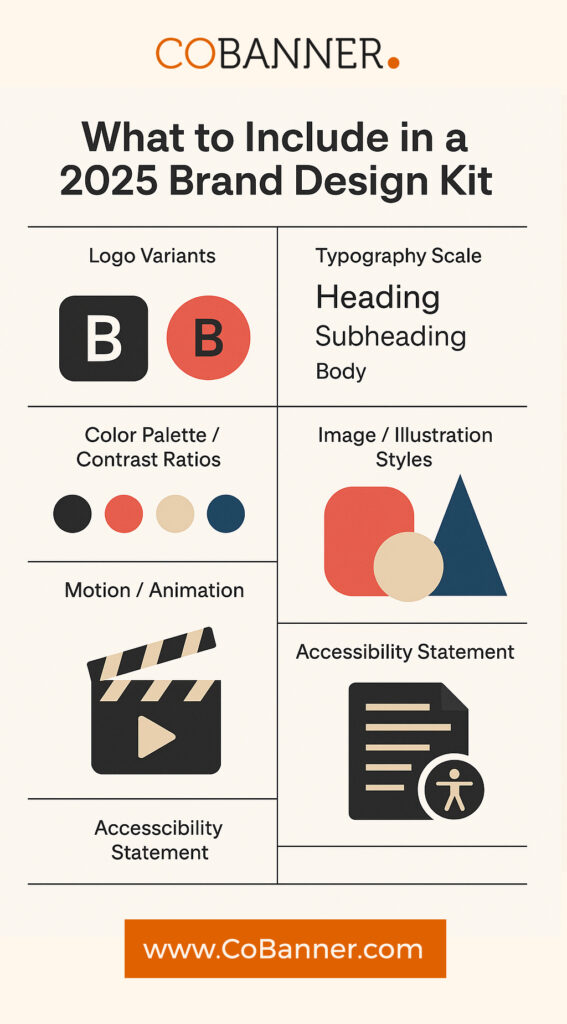
This infographic breaks down the key elements every modern brand should include in their design readiness checklist. While many businesses focus only on visual appeal, this visual emphasizes strategic components such as accessibility, cross-platform consistency, ethical AI use, and mobile optimization. By following these guidelines, companies not only improve their visual identity but also enhance user trust, boost SEO, and stay compliant with global design standards. Consider this checklist a baseline for competitive, future-ready branding in 2025 and beyond.
- Brand guidelines (fonts, colors, tone of voice)
- Mobile-friendly visuals
- Alt text + accessibility standards met
- Templates customized, not copied
- Unified design across all touchpoints
- Using AI tools ethically and with human review
Expert Voices: What Designers Say About 2025
We asked top creatives across industries: “What’s one thing brands should stop doing with design in 2025?”
“Stop chasing trends for the sake of trends. Design with purpose.” — Jessica Walsh, &Walsh
“Use AI, but don’t outsource your taste.” — Mike Winkelmann (Beeple)
“Design systems are not optional anymore. They’re your brand’s visual operating system.” — Daniel Eden, Former Designer at Facebook & Dropbox
If you’re a designer and want to contribute, email collaborate@cobanner.com. We’ll be updating this section with community insights.
Graphic Design in 2025: FAQ
What’s the biggest graphic design trend in 2025?
AI-assisted design paired with human refinement is leading the way. Designers now use tools like Adobe Firefly to generate ideas fast while maintaining creativity and originality.
Are templates bad for brand identity?
Templates are a great starting point, but leaving them unedited can make your brand look generic. Always customize with your fonts, colors, and tone.
What tools do professional designers use in 2025?
Figma, Adobe Illustrator, Photoshop (with Firefly AI), Canva Pro, Framer, and Khroma are among the top tools for both UX and brand design work.
How do I make my graphics accessible?
Use strong color contrast, readable fonts, proper alt text, and structure your layout for screen readers. Refer to WCAG 2.1 Guidelines for best practices.
How do I choose the right graphic design agency in 2025?
Start by reviewing the agency’s portfolio, checking testimonials, and evaluating their experience with your industry. Look for transparent pricing, strategic thinking—not just visual flair—and a willingness to collaborate long-term. Agencies like CoBanner offer end-to-end services that evolve with your brand.
Can I use AI tools for brand design without a designer?
While AI tools like Adobe Firefly or Canva’s Magic Design can speed up design tasks, they can’t replace human insight. Without design expertise, you risk inconsistencies, accessibility issues, and off-brand messaging. The best results come from combining AI with professional oversight.
How often should I update my brand visuals?
Most brands should revisit their visual identity every 2–3 years, or when launching new products, entering new markets, or experiencing major growth. Visuals must evolve to stay relevant—but updates should always remain rooted in your brand’s core values and audience expectations.
Ready to Future-Proof Your Brand Design?
At CoBanner.com, we help businesses adapt their visual identity to the fast-changing digital landscape. Whether you need social templates, packaging design, or a full rebrand, our creative team blends trend awareness with timeless strategy.
Explore our graphic design services or contact us to start creating visuals that drive results in 2025 and beyond.